DBS stands for the Government’s Disclosure and Barring Service. The service provides criminal record checks that help organisations in the public, private, and voluntary sectors to identify applicants who may be unsuitable to work with vulnerable adults and children.
An application for criminal record checks and associated information is known as a Disclosure. This disclosure document gives headlines of an applicant’s criminal record, including convictions, reprimands, and any warnings held on the police national computer.
Given the nature of Pathfinders Camp, we have a “duty of care” to carry out DBS checks on all volunteer helpers.
The process has 5 steps:
Step One – Gather Documents
Identity verification
In line with the DBS code of practice, all applicants requiring a DBS check must have proof of their identity. To do that, you will need to gather together some documents and have your identity checked in line with one of three routes.
What route to follow
Route 1: Three documents must be seen. One must be from Group 1 and two more can be from Groups 1, 2a or 2b. Please contact us as soon as you can if you believe that you are unable to use this route.
Route 2: Three documents must be seen. One document must be from Group 2a, and two more documents from Group 2a or 2b. Special arrangements have been introduced for external ID validation if route 2 is to be used.
Route 3: Can only be used if Routes 1 and 2 have failed. Please email jane.pyzniuk@btinternet.com if that occurs.
At least one document must show your current address, and at least one document must show your date of birth.
What documents to gather
Group 1 ~ Primary trusted identity credentials
- Current valid Passport (any nationality)
- Biometric Residence Permit (UK)
- Current Driving Licence (UK/Isle of Man/Channel Islands)~ Full or Provisional
- Photo card only valid if presented with paper counterpart (except Jersey)
- Original Birth Certificate (issued within 12 months of date of birth)
- Full or short form acceptable including those issued by UK authorities overseas, such as Embassies, High Commissions and HM Forces. N.B. Photocopies not acceptable.
Group 2a ~ Trusted Government/State-Issued Documents
- Current UK Driving Licence (old style paper version)
- Current Non-UK Photo Driving Licence (valid only for applicants residing outside the UK at time of application)
- Birth Certificate (UK & Channel Islands) (issued after the time of birth by the General Register Office/relevant authority)
- N.B. Photocopies not acceptable.
- Marriage/Civil Partnership Certificate (UK & Channel Islands)
- Adoption Certificate (UK & Channel Islands)
- Firearms Licence (UK & Channel Islands)
- HM Forces ID Card (UK)
Group 2b ~ Financial/Social History Documents
- Issued whenever
- Bank/Building Society Account Opening Confirmation Letter (UK)
- EU National ID card
- Cards carrying the PASS accreditation logo (UK & Channel Islands)
- Letter from Head Teacher or College Principal (16/17 year olds in full-time education – only use if there is no alternative document available)
- Issued within the last 3 months
- Bank or building society statement (UK or EAA)
- Utility bill (UK) (NOT mobile telephone)
- Benefit Statement, e.g. Child Allowance, Pension
- Credit Card Statement (UK or EEA)
- A document from Central/Local Government/Local Authority giving entitlement (UK & Channel Islands) – e.g. from the Department of Work & Pensions, the Employment Service, Customs & Revenue, Job Centre, Job Centre Plus, Social Security
- Issued within the last 12 months
- Mortgage statement (UK or EEA)
- Financial statement (e.g. pension, endowment, ISA) (UK)
- P45/P60 statement (UK & Channel Islands)
- Council Tax statement (UK & Channel Islands)
- Work permit/visa (UK) (UK Residence Permit)
Step Two – Apply for DBS
Logging onto the system

Our partner for DBS checking is ‘Matrix’.
Please enter the following address in the browser: https://www.matrixscreening.com/cheqs/
Mistakes on the application form will cause delays in processing and could possibly affect your joining us at camp.
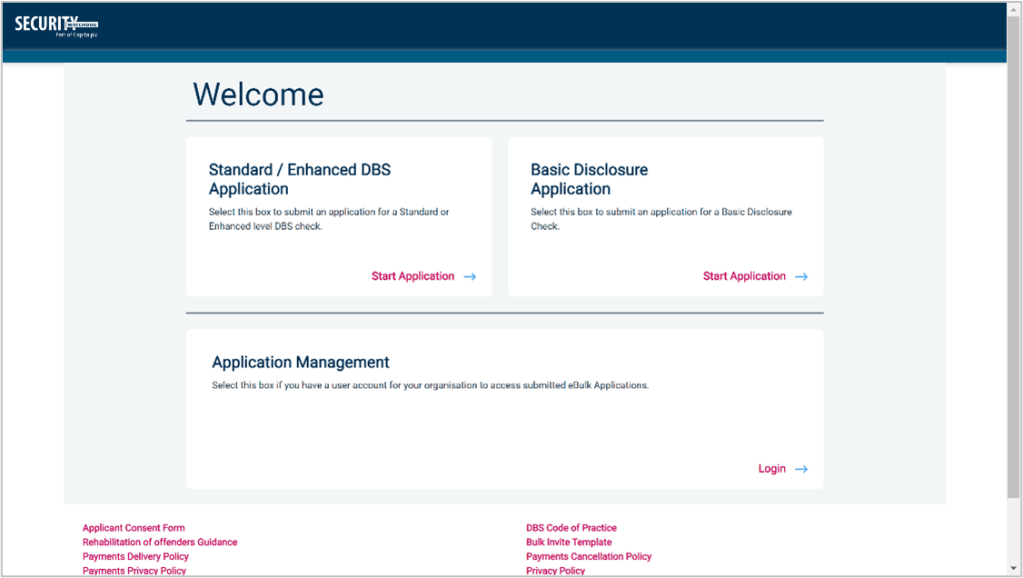
Please click on “Start Application »” in the box “Standard/Enhanced (DBS) Application”.
For the organisation reference use “Pathfinders” and for organisation code use “CampCRB”.
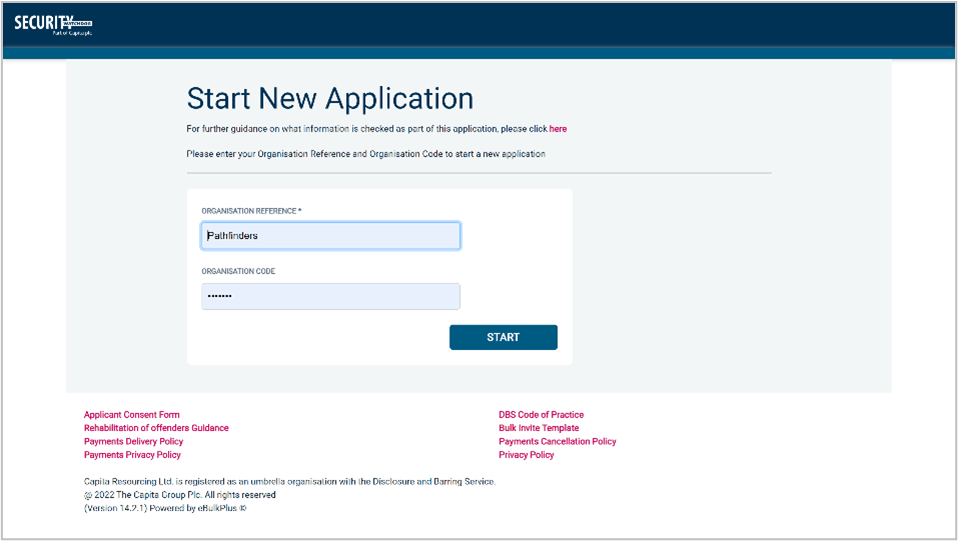
Once you have completed this section click “Enter”.
On the page entitled “Security Watchdog Statement of Fair Processing” tick the box “I have read and understand this statement (tick to confirm)” and then click “Next”.
On the next page tick the box “I have read and understand this statement (tick to confirm)” and then click “Next”.
The application form is a simple 5 step process. Please complete as fully as possible. Mandatory fields are denoted by (*).
Section 1 – About You
Please enter your personal details. If you have any middle names you must ensure that these are entered.
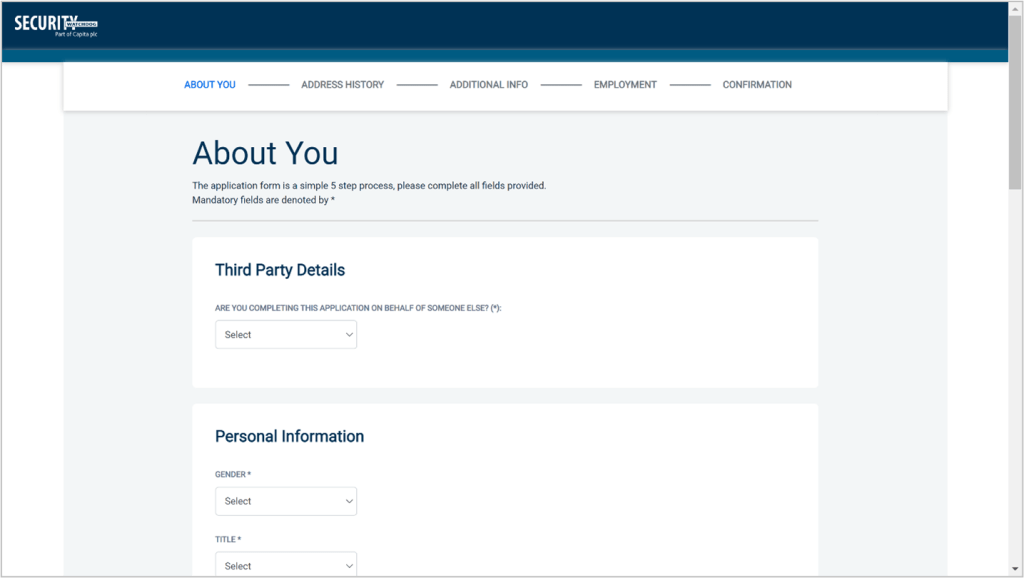
Once you have completed this section click “Next”.
Section 2 – Address History
Please enter your current address. If you haven’t lived at this property for more than five years, you will be taken to another screen. Here you will be required to add any additional addresses to ensure your address history goes back the required five years. Please note if you do not provide a minimum of five years of address history, you will not be able to proceed to the next stage of the application process.
Address Dates
There cannot be any gaps/overlaps in your address history. Please make sure that the month and year of each address follows that of the previous address. Once an address has been entered, you can edit any information by clicking on the “Edit” button.
Postcode
Please ensure that all UK addresses have a full postcode, if you can’t remember your postcode; please use the Royal Mail UK Postcode Finder.
Foreign Addresses/Travelling Overseas
If you cannot supply the address for a foreign country then please enter ‘No fixed abode’ for Address Line 1. Please then enter the Town/City and Country of where you were residing within this period.
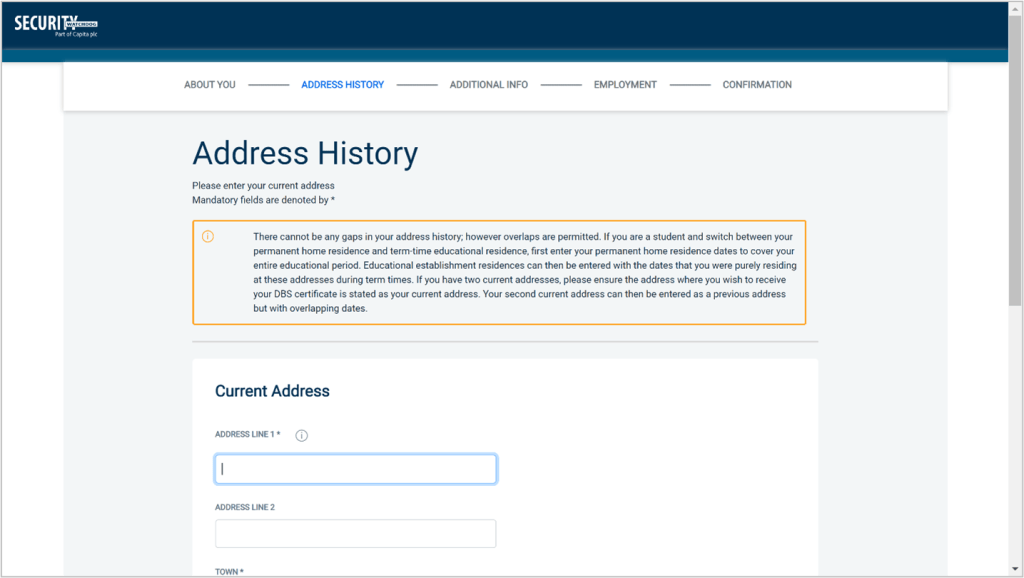
Once you have completed this section and confirmed that you have lived at no other addresses in the last five years you will be able to click “Next”.
Section 3 – Additional Info
Place of Birth
Please enter details for your place and country of birth.
Changed Surname
If you have changed your surname, please provide your birth surname and the year you changed it.
Other Names
Please provide details of any other names used at any time during your lifetime and the dates during which the names were used. Please enter each forename, middle name(s) and surname separately using the “Add Name” button below.
Failure to supply any additional information may cause your application to be delayed and could possibly affect your joining us at camp.
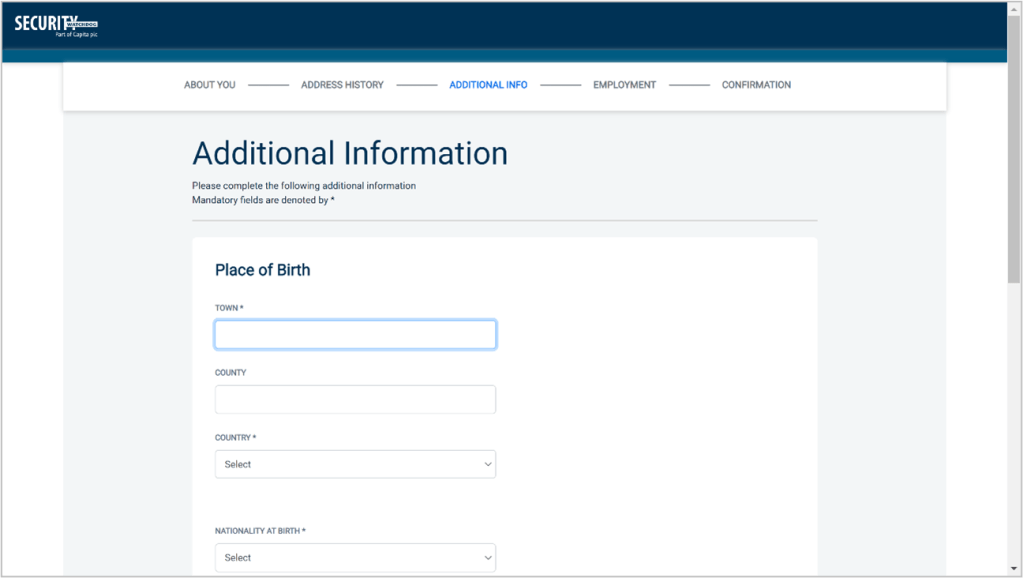
Once you have completed this section click “Next”.
Section 4 – Employment Details
Position Applied For
Enter this as “Volunteer Personal Assistant”.
Employer Name
This has been defaulted to the organisation you are applying through and should not be amended.

Conviction History
If you have never committed a criminal offence, then please select “no”.
If you have an ‘unspent’ conviction, then please select “yes”. An ‘unspent’ conviction is any conviction that is still held on your criminal record.
For exceptions to this legislation or for more information, please refer to the Rehabilitation of Offenders Act 1974 at: http://www.justice.gov.uk/guidance/docs/rehabilitation-offenders.pdf
Once you have completed this section, click “Next”.
Section 5 – Confirmation and Consent
Please check your application to ensure that there are no omissions/errors before you submit it. If you wish to edit a section of your application, click on “Edit” next to the section of the form that requires any amendments.
At the end of the application, please make sure that you complete the Applicant Consent section.
By completing the form you will be consenting to the transfer of your information to the Disclosure and Barring Service for the purpose of a Disclosure Application.
You will be required to confirm that the information that you have provided in support of the application is complete and true and understand that knowingly making a false statement for this purpose is a criminal offence.
Please tick the box on the application as shown to indicate your consent.
Finally, click “Complete”.
You have now completed your application form, and you will be given a reference number. Please make a note of this number for reference purposes, as Pathfinders Camp may ask you for it. If you entered an email address on your application form, you will receive a confirmation email containing these details.
Your application will now be processed by Pathfinders Camp and then sent to the DBS.
Step Three – Prove Identity
There are two methods of proving your identity:
- Under 18s – Zoom – if you are under 18 years old at the time of applying, we’ll invite you to a Zoom call to show us your documents
- 18s or over – Digital ID – if you are 18 or over, have a smartphone, passport and driving licence, you can do it all online
The Zoom method is covered in updated guidance from the government here.
Under 18s – Zoom
Some time after you’ve completed your DBS application, you’ll receive an invitation to a Zoom call with us.
In that meeting, we’ll ask you to hold up your documents one by one.
After the meeting, we also need you to take clear photos of the documents you have shown us and to send these through to us by email to jane.pyzniuk@btinternet.com.
18s or over – Digital ID
Some time after you’ve completed your DBS application, you’ll receive an email from “ebulkadmin@ebulk.teammatrix.com” entitled “Invitation to submit ID documents digitally for your criminal record check application”.
You’ll need a smartphone and your documents for this next step.
Click the link in the email from your smartphone and follow the instructions on the screen. The documents you have available will determine the flow through the process. It may be as simple as presenting a passport and a driving licence, and then taking a selfie video.
All the information will be delivered securely to Matrix, and Pathfinders Camp will be notified that you’ve proven your identity.
Step Four – Register for Updates
What the DBS Update Service provides
The DBS provides a service to individuals and to organisations, enabling them to receive updates if ever the situation changes for a volunteer or employee. In effect, this keeps your disclosure up to date. This is useful to Pathfinders as this means we can recheck your details without the need for a further check when you return for future camps with us. Volunteers can apply to the update service free of charge, and it will cost Pathfinders nothing to recheck your details annually. It will also be useful to you as you will be able to share this disclosure with future employers, so if you apply to work with another organisation, you won’t have to wait for another DBS check to be done.
Application Reference Email
You’ll get an email from “ebulkadmin@ebulk.teammatrix.com” with a line reading: “Your reference is: NNNAAAANNNNNNN.”
That is your reference number with Matrix, and that’s useful but not vital in this process.
Application Sent to DBS Email
You’ll then get an email later again from “ebulkadmin@ebulk.teammatrix.com” with a line reading: “The DBS have received your application electronically, and your application form reference is: ANNNNNNNNNN.”
It is this number reference you need in the next step.
Subscribing to the service
Go to www.gov.uk/dbs-update-service:

Click on “register online”:
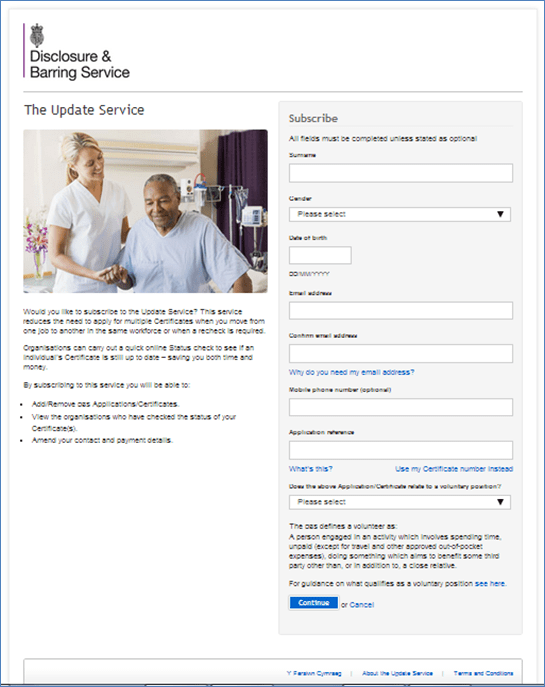
Fill in the form using data you got in the second email for the field “Application reference”.
You’ll then get:
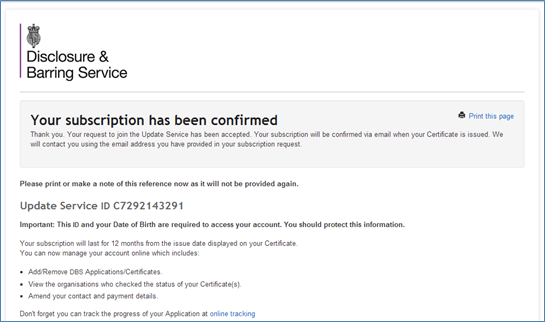
Please keep your “Update Service ID” reference number somewhere safe for future reference. You will need this in order to maintain your subscription to the update service. Renewing your subscription as a volunteer will not cost you anything.
Please send an email to jane.pyzniuk@btinternet.com with a line that says “I give consent for you to download my disclosure results” and confirm that you have subscribed to the Update Service.
Please note that there is a 30-day limit on applying to the Update service from the time your certificate gets printed.
Finally, please either scan and send a copy of your new DBS Certificate by email to jane.pyzniuk@btinternet.com or photocopy and send to:
Jane Pyzniuk
7 Woodlea Chase
Bull Hill
DARWEN
Lancashire
BB3 2TP
Step Five – Keep Updates Alive
Why keep your DBS update service alive?
Your DBS check is available to other organisations (including those for whom you may wish to volunteer) via the DBS update service. However, the DBS update service is a one-year rolling subscription. So, every year you will need to refresh your subscription to keep it alive. The alternative is to carry out the same process described above the next time you want to volunteer.
Renewing your annual subscription
Each year, just before the anniversary of your registration for the update service, you will be sent an email from “donotreply@dbs.gov.uk” entitled “FYI: Action required to renew your Update Service subscription”. In that email, they will include your subscription ID, which is of the form “ANNNNNNNNNN“.
Follow the link to https://secure.crbonline.gov.uk/crsc/subscriber
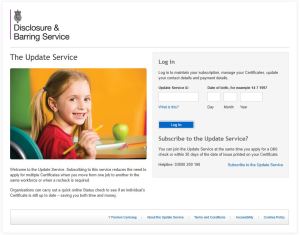
Enter your subscription ID and your date of birth.
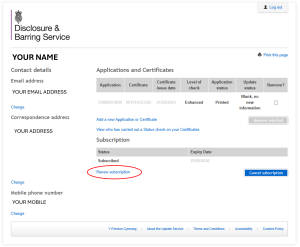
Select the option to renew your subscription.
 Pathfinders Camp